Free email signature generator.

A polished signature with your photo or logo, brand color and social links. Pick a layout, then copy it straight into Gmail or Outlook. No account, no branding added.

Layout

Details

Photo or logo

Uploads are embedded in the signature. A hosted URL displays most reliably across every email app.

Social links

Brand color

Copied — paste it into your email settings.
New message
To: customer@email.com    Subject: Your wrap quote

Hi — thanks for reaching out! Your quote is attached, and I've held a slot for you this Thursday.
Best,

Optional: get email & follow-up tips that close more jobs. No spam, unsubscribe anytime.

While you're at it

A pro signature is nice. Fast follow-up closes jobs.

Your signature polishes the emails you send. Wrapstart makes sure they actually go out — instant replies to new leads, timed follow-ups that never forget, and every conversation tracked to a booked job. Same shop, same spend: 3× conversions.
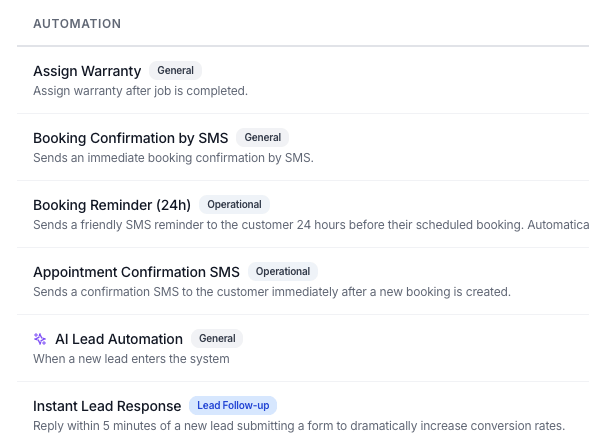
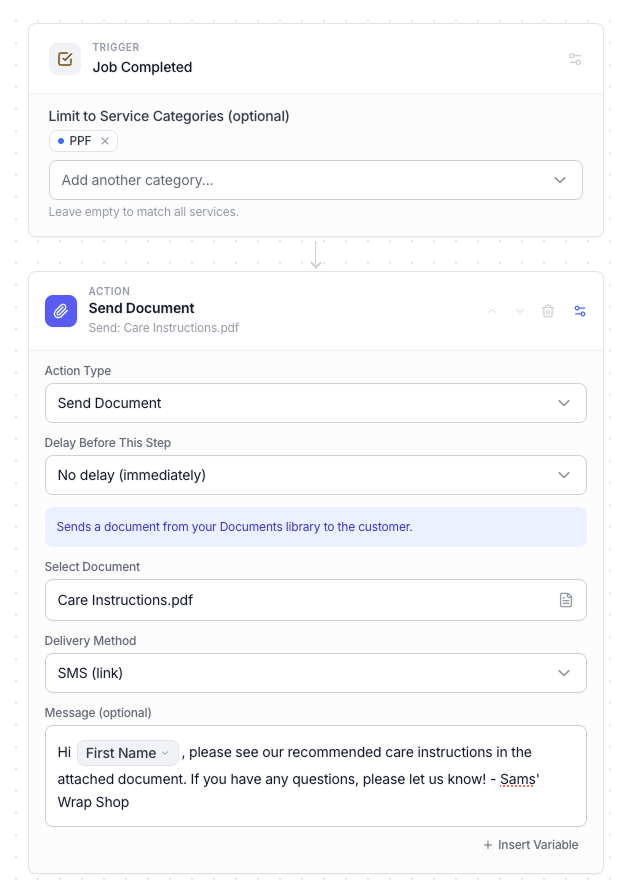
Wrapstart automations — instant replies and timed follow-ups

Frequently
asked questions

How do I add the signature to Gmail?

Click Copy signature, then in Gmail go to Settings → See all settings → General → Signature, create a new signature and paste (Ctrl/Cmd+V). Save changes at the bottom.

How do I add the signature to Outlook?

Click Copy signature, then in Outlook go to Settings → Mail → Compose and reply (or File → Options → Mail → Signatures on desktop), create a new signature and paste it in.

Is this signature generator free?

Yes — completely free, no account and no branding added to your signature. Everything runs in your browser.

Why isn't my photo showing for recipients?

Uploaded images are embedded directly in the signature, which most email apps support. For maximum reliability across every client, host the image online and use the image URL field instead.