Essentials — Email Campaigns

Email campaigns that already know your customers.

A full campaign system — journeys, touchpoints, templates and tracking — built into the platform that already holds your customers, vehicles, quotes and jobs. Write it with AI. Send it from Wrapstart. See what it booked.

1. Content2. Audience3. Review & send
AddAIStylesDetails
Add content
Content blocksDrag into your email, or click to add
ImageHHeadingTParagraphButton—Divider↕SpacerSocialOfferServicesBefore & afterReferralHTML
Show less
Blank columnsDrag in, then drop content into each
1 column2 columns3 columns
Build with AIImport HTMLPreview
Subject linePreheader textA quick favour, {{first_name}}?A short Google review helps us keep doing right by you for years to come.
Your email starts hereDrag blocks in from the left, import HTML, or just describe it to Wrapstart AI.
Thanks for trusting us with your {{vehicle}}
Hi {{first_name}},
Thank you for choosing YYC Wraps. We don't take it lightly when someone hands over their vehicle, and we hope you're happy with how it turned out.
If you have a minute, a Google review would mean a lot. Reviews help new customers find us — and a busy shop is one that can stand behind its work for the long haul.
Photo from job ·2024 BMW M4
Leave a Google review
Honest feedback is welcome, and it only takes a minute or two. Thanks for being part of the shop.

The YYC Wraps team
HTML BLOCK
YYC Wraps · 4412 Manitoba Rd SE, Calgary
You're receiving this because you're a customer. Unsubscribe
Who receives thisFrom your CRM
Job statusCompletedCompletedLast 30 daysHas emailYes+ Add filter
142customers matchLive from your customer records — no export, no list upload.
Build with AIKnows your services, pricing, customers and brand voice.
Write a review-request emailfor customers whose job wascompleted last week. Warm andshort, link to Google reviews.
Describe the email — I'll write it in your voice.Drafting in the voice of YYC WrapsDone — 8 blocks, a subject line and a suggested audience.
Suggested for your shop
Quote follow-up · 3 days unansweredPPF one-year check-inWinter ceramic coating promoReferral ask after 5-star review
Import HTMLPaste a template or snippet — it becomes editable blocks, nothing is locked.
<table role="presentation" width="100%"><tr><td align="center" style="padding:24px"><a href="https://instagram.com/yycwraps">Instagram</a> ·<a href="https://tiktok.com/@yycwraps">TikTok</a><p style="color:#888;font-size:12px">4412 Manitoba Rd SE, Calgary</p></td></tr></table>
Replace emailAdd as block
CancelImport
BackNext
Draft ready
Every block is editable. Keep chatting to change the tone or add an offer.

Everything Mailchimp does. Already connected to your shop.

Journeys

Multi-step sequences triggered by what happens in your shop.

Touchpoints

Follow-ups, reminders, check-ins and anniversaries — on time, every time.

Written with AI

Describe the campaign; Wrapstart AI drafts it in your voice, with your services.

Audiences from your CRM

Segment by service, vehicle, last visit, spend or lead status. No exports.

Templates & builder

Drag-and-drop editor with your logo, colours and branding baked in.

Tracked to revenue

Opens and clicks, yes — and the quotes, bookings and jobs that followed.

01 — TEMPLATES

Use a template or create your own.

Start from a template built for the work you do — limited-time offer, new service launch, project showcase, monthly newsletter, we-miss-you — already carrying your logo, colours and shop details. Or start blank and build exactly what you want. Every template is a starting point you can change block by block.

  • Templates for selling, announcing, telling a story, educating and following up
  • Your logo, address and branding filled in automatically
  • Coupon codes, before-and-afters and service blocks ready to go
  • Save your own templates and reuse them
  • Or start from scratch — a heading, a paragraph and a button
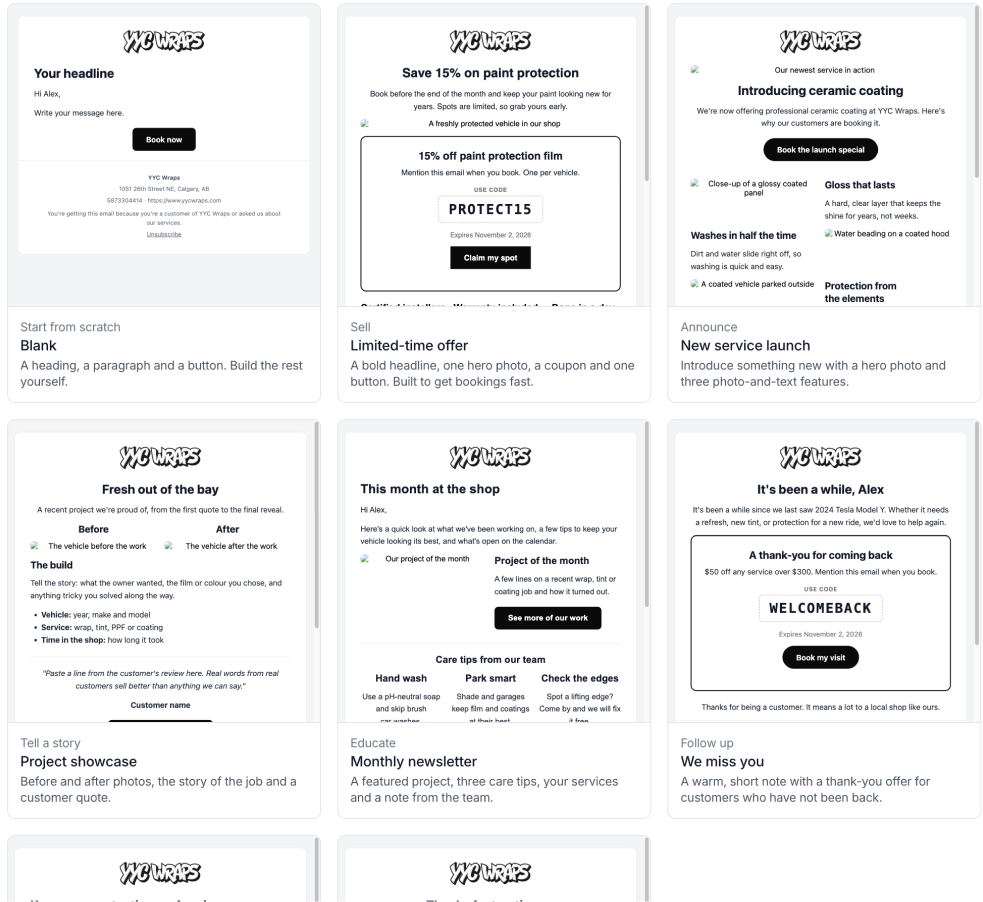
Email templates — Blank, Limited-time offer, New service launch, Project showcase, Monthly newsletter and We miss you, each with the shop's logo and branding
02 — WRITTEN WITH AI

Describe the campaign. AI writes it — with your services and your voice.

Tell Wrapstart AI what you want to send and who it's for. It drafts the subject line, the body and a suggested audience using your actual services, pricing and brand tone — not a generic template. You edit, approve and send.

  • Subject lines, body copy and preview text
  • Pulls in your services, prices and policies
  • Suggests the audience that fits the message
All campaigns
Branded emails to your customers and leads, sent from your own domain.
New campaign
Start with what you want this campaign to do. The AI writes the email from your services, prices and job photos, and picks who it goes to.
What do you want this campaign to do?
More bookingsFill a slow weekWin back past customersGet reviews
Get referralsAnnounce somethingSeasonal promoNewsletter
Which services? (optional)
Partial PPFPaintless Dent RepairRocker + Lower Doors PPFFull Front PPF
Ceramic Coating – 2 YearWindow TintChrome DeleteVinyl Wrap
Anything else? (optional)
We just got a new ceramic line in. Mention we're open Saturdays in November.Make a campaign for our leads only. Winter is coming and they should be thinking about protecting their vehicles —rock chips and road salt will damage paint, and rust starts in the chips. Spending a few dollars now saves a lot later.We'll offer $100 off to the first 10 people who book.
Include an offer
The offer, exactly as customers should read it
$100 off for the first 10 people to book
WINTER100
Ends Nov 30, 2026
Who gets it?
Let AI pick from the goal
Only people who can receive marketing email get it, whichever you pick.
Start without AICancelBuild my campaignBuilding
Here's what I built
Check it over. You can change everything in the builder, and nothing sends until you send it.
Campaign
Winter protection for leads – Fall
Subject lines (tested against each other)
Winter's coming. Protect your paint now
A few dollars now, a lot saved later
Rock chips and road salt start working on your paint the day winter hits.
The email
Heading
Winter is coming. Get your paint ready.
Text
Hi {{first_name}}, you reached out about {{vehicle}} a while back, so I wanted to give you a heads up before the cold sets in.
Heading
What winter does to unprotected paint
Text
Rock chips. Gravel on winter roads hits the front end hard, and every chip is a spot where paint is gone. Salt gets in next.
Services
Partial Front PPF, Rocker + Lower Doors PPF, Ceramic Coating – 2 Year
Text
Paint protection film takes the hit from rocks and salt so your paint doesn't.
Offer / coupon
$100 off for the first 10 people to book · WINTER100 · ends Nov 30
Before & after
4 photos from recent PPF jobs
Button
Book your spot
Goes to
Leads who can receive marketing email · 86 people
Good time to send
Tuesday, Oct 6, 10:00 AM
Change the briefOpen in builder
03 — BUILDER & HTML IMPORT

Build it in Wrapstart — or bring your own HTML.

The drag-and-drop builder covers everything: headings, images, buttons, before-and-afters, offers, referral blocks and multi-column layouts, with your logo and colours baked in. And if you already have a design you love, import the complete HTML straight into the builder. Have ChatGPT, Claude or whatever AI you use write it — point it at your website so it matches your brand — then paste the result into Wrapstart. It becomes editable blocks, not a locked file.

  • Drag-and-drop blocks, prebuilt columns and saved templates
  • Import complete HTML emails or single snippets
  • Imported HTML stays editable inside the builder
  • Personalisation tags like {{first_name}} and {{vehicle}} work in imported designs too
  • Desktop and mobile preview before you send
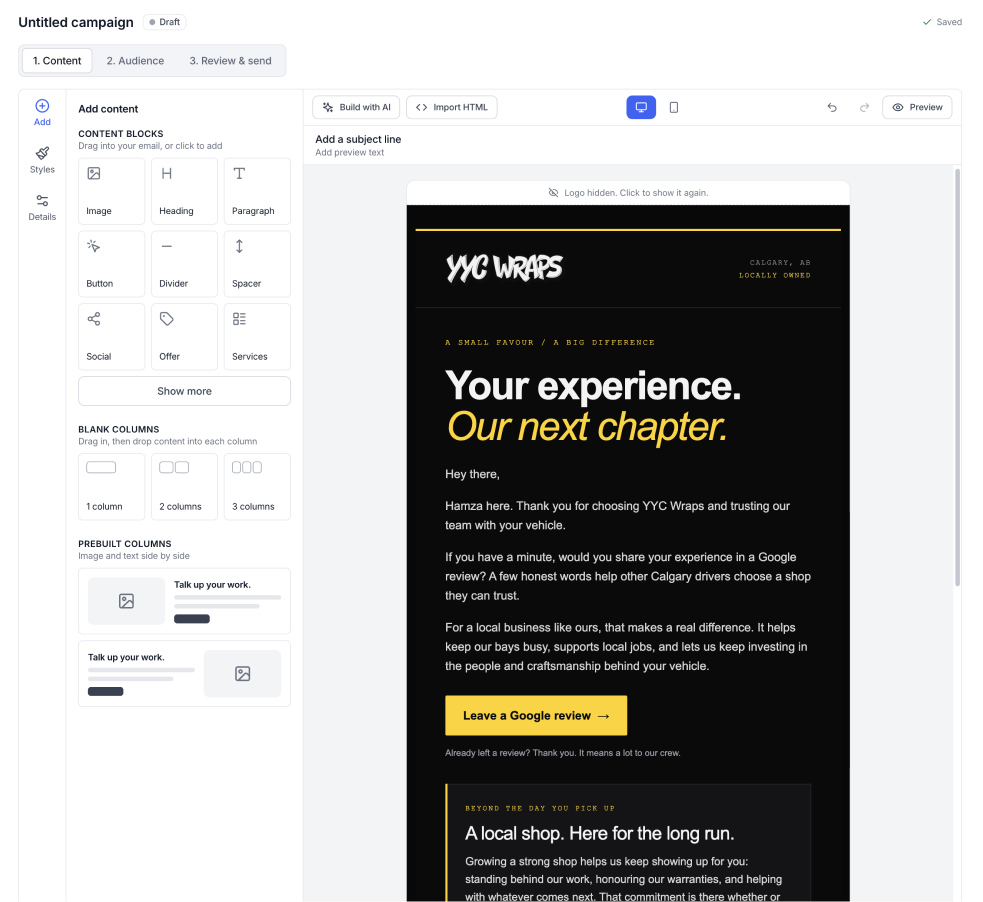
Campaign builder with Build with AI and Import HTML buttons, content blocks on the left and a fully branded imported email on the canvas
04 — AUDIENCES

Your list is already built. It's your CRM.

No CSV exports, no list uploads, no "sync" that breaks. Every customer, lead and vehicle in Wrapstart is available to target — and the audience updates itself as your data changes.

  • Segment by service, vehicle make, last visit, lifetime spend
  • Target leads by pipeline stage — or customers who went quiet
  • Saved audiences that refresh automatically
  • Consent and unsubscribes handled per contact
  • Suppression for open quotes, active jobs or recent sends
1. Content2. Audience3. Review & send
Live from your CRM
Who receives this
Your customers and leads — the same list you already see in CRM & Leads. Filter it, don't upload it.
Customers + LeadsService PPF or Ceramic×Last visit 6+ months ago×Has email Yes×+ Add filter
CustomerStatusServicesLast visitSource
142 match · updates itself as your CRM changesNext
05 — CAMPAIGN CALENDAR

Every send, every journey, on one calendar.

See the month the way you plan the shop — by day. Promos, review requests, journey steps and reminders are colour-coded by type, and the emails your journeys trigger on their own land right next to the ones you scheduled. Drag a campaign to a new day to move it.

  • Colour-coded by type: promo, review request, journey step, reminder
  • Sent, scheduled and draft at a glance
  • Drag to reschedule — audience and content come with it
  • Journey and automation sends appear automatically
All campaigns
Branded emails to your customers and leads, sent from your own domain.
View analytics+ Create
ListCalendarPromoReview requestJourney stepReminderDraft
October 2026Today
SunMonTueWedThuFriSat
27
28
29
30
1Quote · Day 2
2Untitled campaign
3Review requestReview · 142 sentUntitled campaign
4Quote · Day 5
5
6Tint reminder
7
8Quote · Day 9
9
10
11
12
13Ceramic top-up · 6
14
15Winter promo
16
17
18
19
20PPF check-in · 4
21
22Review request
23
24
25
26
27Tint anniversary · 9
28
29
30
31
Fall PPF promo
New campaign
Fall PPF promo
Type
PromoReview requestReminder
Send
Thu, Oct 8 · 9:00 AMYour domain · warmed up
Audience
PPF leads · last 90 days64 people from your CRM
Save draftSchedule
Scheduled · Thu Oct 8, 9:00 AM
Fall PPF promo → 64 PPF leads from your CRM
Rescheduled
Fall PPF promo → Sat Oct 10. Audience and content moved with it.
Review request sent
142 customers · 38 opened in the first hour
Journeys schedule themselves
5 touchpoints added from quote and job events
A journey, start to finish

What one journey actually looks like.

Quote sent — no answer

Trigger: quote status stays "Sent" for 48 hours · Exits when accepted, declined or they reply
Day 2 · Email"Any questions on your quote?"Personal note with the quote link. Written by AI, in your voice.
Day 5 · SMSQuick text check-inShort, human, with a one-tap link to accept or ask a question.
Day 10 · EmailWhy shops choose youReviews, warranty and what's included — straight from your service catalog.
Day 21 · Hand offFlag for a callLead moves to a call list and your AI agent or a team member picks it up.
This is the point of Wrapstart

One system. Everything talks to everything.

Standalone email tools know an address and a first name. Wrapstart knows the vehicle, the last job, the open quote and the installer who did the work. That's what makes the email relevant — and what makes the result measurable.

CRM & LeadsAudiences and triggersEvery contact and pipeline stage is a segment or a journey start.
Quotes & ProposalsLinks that convertDrop the live quote straight into the email. Accept in one tap.
Jobs & CalendarTiming that fitsCompleted job, upcoming booking, anniversary — all usable as triggers.
AI AgentsReplies handledWhen a customer answers, your agent can take the conversation from there.
Unified inboxOne thread per customerEmail, SMS and lead messages in a single history.
ReportsRevenue, not just opensCampaign results roll into the same analytics as the rest of the shop.
Get started

Try Wrapstart free for 14 days.

Every feature unlocked. No credit card required. Import is so easy you'll never need to hire a third party or pay for setup.

Wrapstart

Frequently
asked questions

Do I still need Mailchimp or a separate email tool?

No. Wrapstart Email Campaigns is a full campaign system — audiences, templates, journeys, scheduling and reporting — built into the same platform that holds your customers, quotes and jobs. There is nothing to export, import or keep in sync.

What is a journey?

A journey is a sequence of emails and actions triggered by something that happens in your shop — a quote that hasn't been accepted, a job that was completed, a PPF install hitting its one-year mark. Each step can wait, branch, or stop the moment the customer books or replies.

How does the AI help build campaigns?

Describe the campaign in plain language and Wrapstart AI drafts the subject line, body and suggested audience using your own services, pricing and brand voice. You edit, approve and send.

Can I import an email I designed somewhere else?

Yes. Paste complete HTML — or a snippet — straight into the builder and it becomes editable blocks. Many shops have ChatGPT or Claude write the email, reference their website so it matches the brand, then import the result into Wrapstart and send it to an audience from their CRM.

What can I track?

Delivery, opens, clicks and replies per campaign — plus what matters: quotes requested, bookings made and revenue closed by the customers who received it, because those records live in the same system.
Book a demo

See how much more your shop could close.

Forty-five minutes, live. We'll walk you through how Wrapstart runs a shop day to day — how to manage the work, follow up without dropping anyone, and get more out of the customers you already have. No pitch deck, no pressure.

  • 45 minutes
  • Live walkthrough
  • Built for wrap, PPF & tint shops